Posts

Useful Computer Shortcuts / Key Combinations

Image
We got this on a WhatsApp post so we decided to share it on our blog because it is so needed and very useful to all computer users especially for speed and some other important reasons. For example with some of this shortcuts, you can operate your computer when your mouse suddenly starts to fail. Recently, a client brought his laptop to us for repair. His trackpad and left click button stopped working some months ago. But that didn't stop him from using the system(he started using shortcuts) until he got the money or was ready to repair it. So you never can tell where any of these shortcuts will be very important. Apologies to the rightful owner of this content whom we could not trace. "Press this key To do this Ctrl + C (or Ctrl + Insert) Copy the selected item Ctrl + X Cut the selected item Ctrl + V (or Shift + Insert) Paste the selected item Ctrl + Z Undo an action Alt + Tab Switch between open apps Alt + F4 Close the active item, or exit the active app Windows logo key  + ...

Slow Computer, Know why?

Image
A slow computer is one of the vectors which has a sting that is full of pathogen that causes head ache. What am I saying? In other words one of the cause of head ache is a slow computer. I guess you already got the symptoms! Just relax for I am here to expose a secret that will help you to stay healthy by guiding you on how to speed up your computer or laptop. Why is My Computer/Laptop Slow? There are several reasons why your computer could be slow. I will give you just five (5) out of them. 1. Poor Processor Speed: The processor is responsible for all calculations, computing and processes. So if the processor is small, the computer speed will be slow. The least recommended processor speed is 2G. 2. Low RAM (Random Access Memory): This is a temporal memory. It also contributes to the speed of a computer system. In plain language, the processor relies on the RAM for speed. The least recommended RAM size for me is 2G. 3. Virus: Virus, in many cases, is a major cause of reduced speed of a...

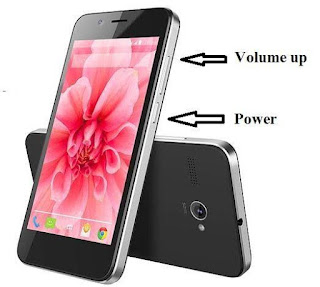
Restarting or Shutting a Not Responding Android Phone Having an Inbuilt Battery.

Image
Restarting or Shutting a Not Responding Android Phone Having an Inbuilt Battery. Phone Not Responding is as issue every phone user can relate with. This problem can be cause by issues related to both software and hardware issues. I assume many of you reading this articles have encountered or are currently encountering this issue. If so, then the question in your mind would be "what the heck am I supposed to do now?" For so many phone user, they don't have to bother themselves too much because they can just pull out their batteries and reinstall and that's all. Other people say "My battery is inbuilt!" "I don't have a screw driver!" "I don't know how to disassemble my phone!" "I can't get a repairer now!" If you belong to this category, don't panic. You can force your phone to go off or restart. All you have to do is long press your volume up+ power button simultaneously. Note: make sure you press the two bottoms ...

How to Recover Deleted Files on Android Phones

Image
Many times we delete some files or data by mistake on our android phones, even though we wish we can have ability to press the command CTRL Z. Unfortunately that is only possible on the PC. If any data is deleted by mistake on the PC there is usually little or no panic because the deleted data can easily be recover either by aforementioned command (i.e Ctrl Z) or through the recycle bin. In case you become a victim of the incidence and you ask yourself "Is it possible to recover a deleted file on my phone?" I have a good new for you, it is possible to recover your deleted data on your android phone through the following means: 1.  ES File Explorer : This is a file manager which is full of features including Recycle Bin, yes Recycle Bin. You can download this free from google play store.  After download, tap the menu bar you will see options like in the image below then tap recycle to turn it on. After turning this feature on whatever data you delete will move to the recycle b...